Mapping with the census

Peter Ralph

2026-02-23

Data: United States Census

County Population by Characteristics: 2020-2024

We’ll have a look at the Annual County and Puerto Rico Municipio Resident Population Estimates by Selected Age Groups and Sex: April 1, 2020 to July 1, 2024 (CC-EST2024-AGESEX)

Data downloaded from census.gov:

We’ll also need “state FIPS codes”:

Shape files:

For maps, we need county boundaries:

What’s in that zip file? It’s a “shape file”, which is actually a bunch of related files. We don’t have to unzip it at all to use it.

$ unzip -l tl_2024_us_county.zip 
Archive:  tl_2024_us_county.zip
  Length      Date    Time    Name
---------  ---------- -----   ----
        5  2024-09-16 10:58   tl_2024_us_county.cpg
   993755  2024-09-16 10:58   tl_2024_us_county.dbf
      165  2024-09-16 10:58   tl_2024_us_county.prj
132150152  2024-09-16 10:58   tl_2024_us_county.shp
    42070  2025-06-02 09:04   tl_2024_us_county.shp.ea.iso.xml
    50721  2025-06-02 09:04   tl_2024_us_county.shp.iso.xml
    25980  2024-09-16 10:58   tl_2024_us_county.shx
---------                     -------
133262848                     7 files

Census data

Set-up:

import pandas as pd
import numpy as np
import plotnine as p9

What do we have?

From the documentation: CC-EST2024-AGESEX.pdf:

The key for YEAR is as follows:

- 1 = 4/1/2020 population estimates base
- 2 = 7/1/2020 population estimate
- 3 = 7/1/2021 population estimate
- 4 = 7/1/2022 population estimate
- 5 = 7/1/2023 population estimate
- 6 = 7/1/2024 population estimate

and then

Data fields (in order of appearance):

VARIABLE           DESCRIPTION
SUMLEV             Geographic Summary Level
STATE              State FIPS code
COUNTY             County FIPS code
STNAME             State name
CTYNAME            County name
YEAR               Year
POPESTIMATE        Total population
POPEST_MALE        Male population
POPEST_FEM         Female population
UNDER5_TOT         Total population under 5 years
UNDER5_MALE        Male population under 5 years
UNDER5_FEM         Female population under 5 years
AGE513_TOT         Total population age 5 to 13
AGE513_MALE        Male population age 5 to 13
AGE513_FEM         Female population age 5 to 13
AGE1417_TOT        Total population age 14 to 17
AGE1417_MALE       Male population age 14 to 17
AGE1417_FEM        Female population age 14 to 17
AGE1824_TOT        Total population age 18 to 24
AGE1824_MALE       Male population age 18 to 24
AGE1824_FEM        Female population age 18 to 24
AGE16PLUS_TOT      Total population age 16 years and over
AGE16PLUS_MALE     Male population age 16 years and over
AGE16PLUS_FEM      Female population age 16 years and over
AGE18PLUS_TOT      Total population age 18 years and over
AGE18PLUS_MALE     Male population age 18 years and over
AGE18PLUS_FEM      Female population age 18 years and over
AGE1544_TOT        Total population age 15 to 44
AGE1544_MALE       Male population age 15 to 44
AGE1544_FEM        Female population age 15 to 44
AGE2544_TOT        Total population age 25 to 44
AGE2544_MALE       Male population age 25 to 44
AGE2544_FEM        Female population age 25 to 44
1AGE4564_TOT       Total population age 45 to 64
AGE4564_MALE       Male population age 45 to 64
AGE4564_FEM        Female population age 45 to 64
AGE65PLUS_TOT      Total population age 65 years and over
AGE65PLUS_MALE     Male population age 65 years and over
AGE65PLUS_FEM      Female population age 65 years and over
AGE04_TOT          Total population age 0 to 4
AGE04_MALE         Male population age 0 to 4
AGE04_FEM          Female population age 0 to 4
AGE59_TOT          Total population age 5 to 9
AGE59_MALE         Male population age 5 to 9
AGE59_FEM          Female population age 5 to 9
AGE1014_TOT        Total population age 10 to 14
AGE1014_MALE       Male population age 10 to 14
AGE1014_FEM        Female population age 10 to 14
AGE1519_TOT        Total population age 15 to 19
AGE1519_MALE       Male population age 15 to 19
AGE1519_FEM        Female population age 15 to 19
AGE2024_TOT        Total population age 20 to 24
AGE2024_MALE       Male population age 20 to 24
AGE2024_FEM        Female population age 20 to 24
AGE2529_TOT        Total population age 25 to 29
AGE2529_MALE       Male population age 25 to 29
AGE2529_FEM        Female population age 25 to 29
AGE3034_TOT        Total population age 30 to 34
AGE3034_MALE       Male population age 30 to 34
AGE3034_FEM        Female population age 30 to 34
AGE3539_TOT        Total population age 35 to 39
AGE3539_MALE       Male population age 35 to 39
AGE3539_FEM        Female population age 35 to 39
AGE4044_TOT        Total population age 40 to 44
AGE4044_MALE       Male population age 40 to 44
AGE4044_FEM        Female population age 40 to 44
AGE4549_TOT        Total population age 45 to 49
AGE4549_MALE       Male population age 45 to 49
AGE4549_FEM        Female population age 45 to 49
AGE5054_TOT        Total population age 50 to 54
AGE5054_MALE       Male population age 50 to 54
AGE5054_FEM        Female population age 50 to 54
AGE5559_TOT        Total population age 55 to 59
AGE5559_MALE       Male population age 55 to 59
AGE5559_FEM        Female population age 55 to 59
AGE6064_TOT        Total population age 60 to 64
AGE6064_MALE       Male population age 60 to 64
AGE6064_FEM        Female population age 60 to 64
AGE6569_TOT        Total population age 65 to 69
2AGE6569_MALE      Male population age 65 to 69
AGE6569_FEM        Female population age 65 to 69
AGE7074_TOT        Total population age 70 to 74
AGE7074_MALE       Male population age 70 to 74
AGE7074_FEM        Female population age 70 to 74
AGE7579_TOT        Total population age 75 to 79
AGE7579_MALE       Male population age 75 to 79
AGE7579_FEM        Female population age 75 to 79
AGE8084_TOT        Total population age 80 to 84
AGE8084_MALE       Male population age 80 to 84
AGE8084_FEM        Female population age 80 to 84
AGE85PLUS_TOT      Total population age 85 years and over
AGE85PLUS_MALE     Male population age 85 years and over
AGE85PLUS_FEM      Female population age 85 years and over
MEDIAN_AGE_TOT     Median age for total population
MEDIAN_AGE_MALE    Median age for male population
MEDIAN_AGE_FEM     Median age for female population

First try:

Doing

cc = pd.read_csv("data/cc-est2024-agesex-all.csv")

gets

---------------------------------------------------------------------------
UnicodeDecodeError                        Traceback (most recent call last)
Cell In[18], line 1
----> 1 cc = pd.read_csv("cc-est2024-agesex-all.csv")
...
UnicodeDecodeError: 'utf-8' codec can't decode byte 0xf1 in position 255962: invalid continuation byte

Searching for byte 0xf1 python suggests trying encoding='latin-1'.

Second try:

Let’s just take the “July 2020” numbers (YEAR=2):

cc = (
    pd.read_csv("data/cc-est2024-agesex-all.csv", encoding='latin-1')
    .query("YEAR == 2")
)
cc
SUMLEV STATE COUNTY STNAME CTYNAME YEAR POPESTIMATE POPEST_MALE POPEST_FEM UNDER5_TOT ... AGE7579_FEM AGE8084_TOT AGE8084_MALE AGE8084_FEM AGE85PLUS_TOT AGE85PLUS_MALE AGE85PLUS_FEM MEDIAN_AGE_TOT MEDIAN_AGE_MALE MEDIAN_AGE_FEM
1 50 1 1 Alabama Autauga County 2 58909 28757 30152 3505 ... 1062 1147 494 653 897 338 559 39.1 37.9 40.2
7 50 1 3 Alabama Baldwin County 2 233244 113925 119319 12241 ... 4879 5489 2509 2980 4353 1777 2576 43.6 42.5 44.8
13 50 1 5 Alabama Barbour County 2 24975 13091 11884 1359 ... 529 562 238 324 472 156 316 40.8 39.1 43.5
19 50 1 7 Alabama Bibb County 2 22176 11770 10406 1216 ... 402 469 194 275 400 123 277 40.5 38.8 42.9
25 50 1 9 Alabama Blount County 2 59110 29376 29734 3450 ... 1165 1289 581 708 1049 382 667 41.1 40.3 42.0
... ... ... ... ... ... ... ... ... ... ... ... ... ... ... ... ... ... ... ... ... ...
18835 50 56 37 Wyoming Sweetwater County 2 42196 21917 20279 2582 ... 461 540 256 284 451 150 301 36.7 36.8 36.7
18841 50 56 39 Wyoming Teton County 2 23384 12202 11182 1096 ... 343 331 156 175 330 135 195 40.5 40.7 40.4
18847 50 56 41 Wyoming Uinta County 2 20461 10390 10071 1294 ... 245 255 117 138 265 98 167 37.4 37.3 37.4
18853 50 56 43 Wyoming Washakie County 2 7663 3941 3722 385 ... 159 225 106 119 210 78 132 44.0 43.0 45.1
18859 50 56 45 Wyoming Weston County 2 6817 3714 3103 310 ... 110 165 68 97 182 70 112 43.6 42.8 44.9

3144 rows × 96 columns

Counties

New packages: geopandas and pyproj:

import pyproj
import geopandas as gpd
import matplotlib.colors
import matplotlib.pyplot as plt

Geopandas: a data frame with geometry!

counties = gpd.read_file("zip://data/tl_2024_us_county.zip")
counties
STATEFP COUNTYFP COUNTYNS GEOID GEOIDFQ NAME NAMELSAD LSAD CLASSFP MTFCC CSAFP CBSAFP METDIVFP FUNCSTAT ALAND AWATER INTPTLAT INTPTLON geometry
0 31 039 00835841 31039 0500000US31039 Cuming Cuming County 06 H1 G4020 NaN NaN NaN A 1477563042 10772508 +41.9158651 -096.7885168 POLYGON ((-96.55525 41.82892, -96.55524 41.827...
1 53 069 01513275 53069 0500000US53069 Wahkiakum Wahkiakum County 06 H1 G4020 NaN NaN NaN A 680980773 61564428 +46.2946377 -123.4244583 POLYGON ((-123.72755 46.2645, -123.72756 46.26...
2 35 011 00933054 35011 0500000US35011 De Baca De Baca County 06 H1 G4020 NaN NaN NaN A 6016818941 29090018 +34.3592729 -104.3686961 POLYGON ((-104.89337 34.08894, -104.89337 34.0...
3 31 109 00835876 31109 0500000US31109 Lancaster Lancaster County 06 H1 G4020 339 30700 NaN A 2169269508 22850511 +40.7835474 -096.6886584 POLYGON ((-96.68493 40.5233, -96.69219 40.5231...
4 31 129 00835886 31129 0500000US31129 Nuckolls Nuckolls County 06 H1 G4020 NaN NaN NaN A 1489645201 1718484 +40.1764918 -098.0468422 POLYGON ((-98.2737 40.1184, -98.27374 40.1224,...
... ... ... ... ... ... ... ... ... ... ... ... ... ... ... ... ... ... ... ...
3230 13 123 00351260 13123 0500000US13123 Gilmer Gilmer County 06 H1 G4020 NaN NaN NaN A 1103804462 12337139 +34.6905232 -084.4548113 POLYGON ((-84.30237 34.57832, -84.30329 34.577...
3231 27 135 00659513 27135 0500000US27135 Roseau Roseau County 06 H1 G4020 NaN NaN NaN A 4329782927 16924046 +48.7610683 -095.8215042 POLYGON ((-95.25857 48.88666, -95.25707 48.885...
3232 28 089 00695768 28089 0500000US28089 Madison Madison County 06 H1 G4020 298 27140 NaN A 1849796735 72079469 +32.6343703 -090.0341603 POLYGON ((-90.14883 32.40026, -90.1489 32.4001...
3233 48 227 01383899 48227 0500000US48227 Howard Howard County 06 H1 G4020 NaN 13700 NaN A 2333034781 8846149 +32.3034298 -101.4387208 POLYGON ((-101.18138 32.21252, -101.18138 32.2...
3234 54 099 01550056 54099 0500000US54099 Wayne Wayne County 06 H1 G4020 170 26580 NaN A 1310547890 15816947 +38.1436416 -082.4226659 POLYGON ((-82.30872 38.28106, -82.30874 38.281...

3235 rows × 19 columns

What’s in there?

Geopandas uses shapely:

g = counties['geometry'][125]
print(type(g))
g
<class 'shapely.geometry.multipolygon.MultiPolygon'>

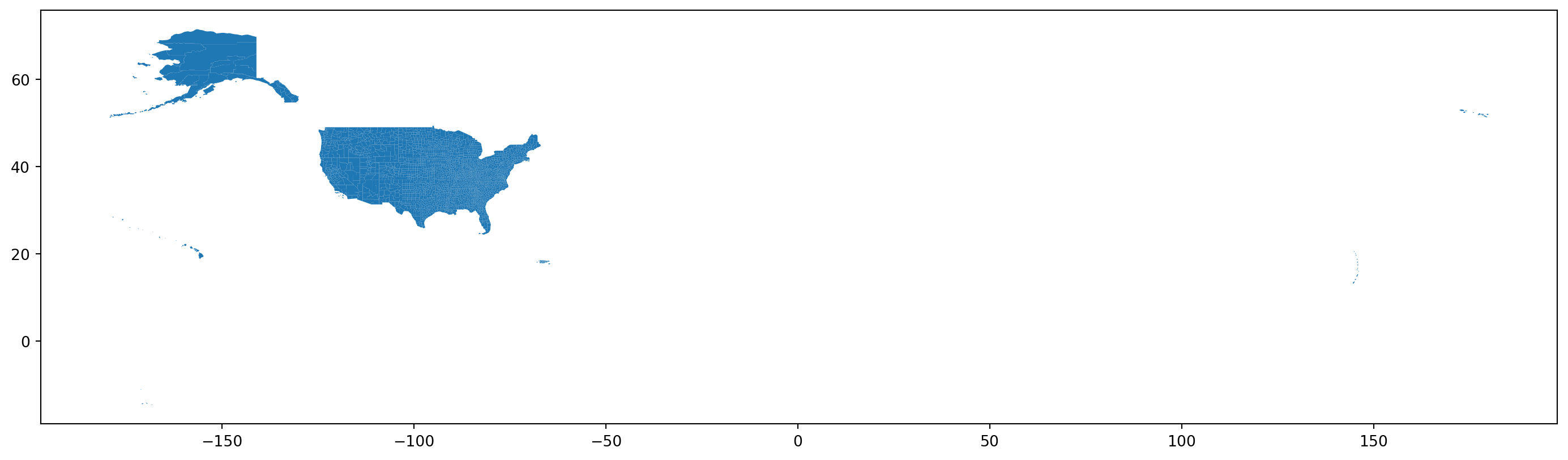
Here’s the best part, though:

fig, ax = plt.subplots(1, 1, figsize=(18, 18))
counties.plot(ax=ax);

Next steps:

  1. Subset down to the contiguous USA.
  2. Reproject to a better CRS.
  3. Add in the census variables.

Subset to a bounding box:

.cx: Coordinate based indexer to select by intersection with bounding box.

Finding “bounding box for contiguous USA” gives these coordinates, used in .cx
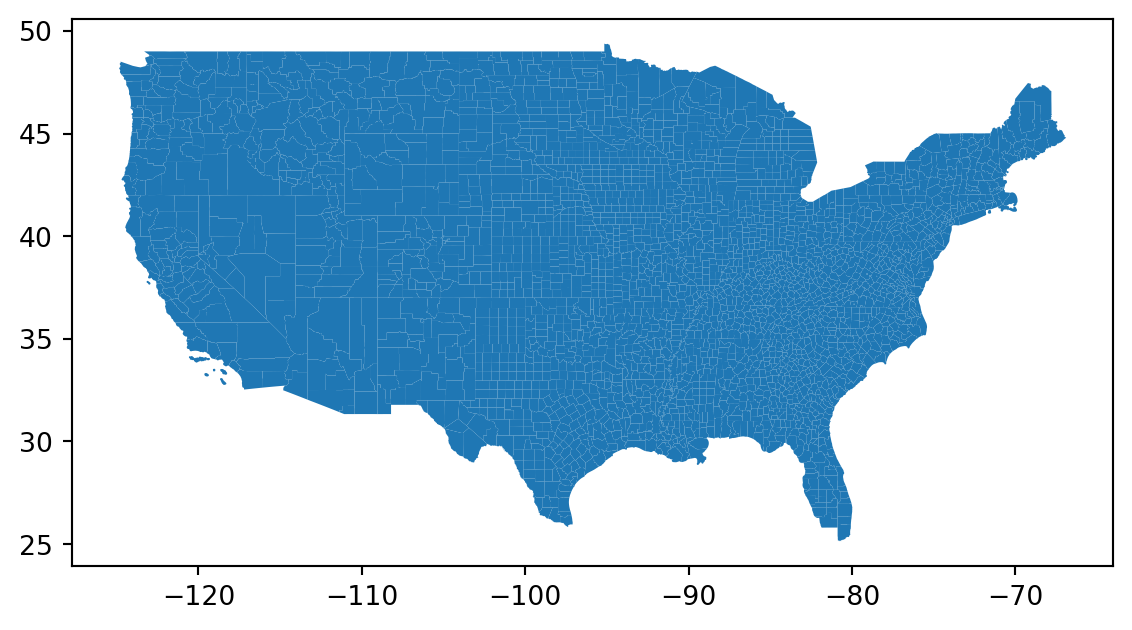
w, s, e, n = (
    124.39, # west
    25.82,  # south
    66.94,  # east
    49.38,  # north
)
# syntax is  .cx[xmin:xmax, ymin:ymax]
counties = counties.cx[-w:-e, s:n]
counties.plot();

Reproject to a better CRS:

Right now, the coordinates are in lat/long. This is probably fine for the contiguous states, but if we were doing Alaska things would start to get weird inaccurate (exercise: what?):

counties.crs
<Geographic 2D CRS: EPSG:4269>
Name: NAD83
Axis Info [ellipsoidal]:
- Lat[north]: Geodetic latitude (degree)
- Lon[east]: Geodetic longitude (degree)
Area of Use:
- name: North America - onshore and offshore: Canada - Alberta; British Columbia; Manitoba; New Brunswick; Newfoundland and Labrador; Northwest Territories; Nova Scotia; Nunavut; Ontario; Prince Edward Island; Quebec; Saskatchewan; Yukon. Puerto Rico. United States (USA) - Alabama; Alaska; Arizona; Arkansas; California; Colorado; Connecticut; Delaware; Florida; Georgia; Hawaii; Idaho; Illinois; Indiana; Iowa; Kansas; Kentucky; Louisiana; Maine; Maryland; Massachusetts; Michigan; Minnesota; Mississippi; Missouri; Montana; Nebraska; Nevada; New Hampshire; New Jersey; New Mexico; New York; North Carolina; North Dakota; Ohio; Oklahoma; Oregon; Pennsylvania; Rhode Island; South Carolina; South Dakota; Tennessee; Texas; Utah; Vermont; Virginia; Washington; West Virginia; Wisconsin; Wyoming. US Virgin Islands. British Virgin Islands.
- bounds: (167.65, 14.92, -40.73, 86.45)
Datum: North American Datum 1983
- Ellipsoid: GRS 1980
- Prime Meridian: Greenwich

Reminder:

Which of the following does a lat/long projection break, and how?

  • Is the visual analogy appropriate for the type of data?

  • Are important comparisons clear?

  • Are units easily interpretable?

Principles of effective display:

  • Show the data

  • Encourage the eye to compare differences

  • Represent magnitudes honestly and accurately

  • Draw graphical elements clearly, minimizing clutter

  • Make displays easy to interpret

Equal area:

Let’s use the Albers equal area for the contiguous US: EPSG:5070
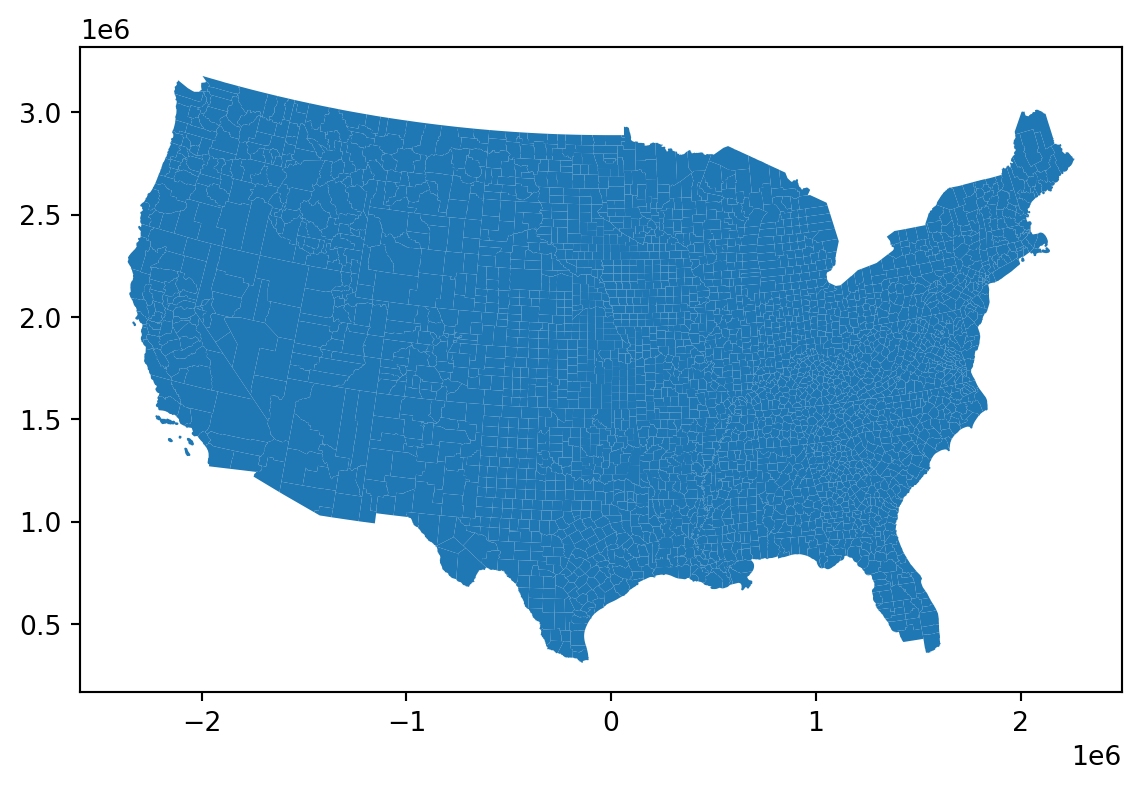
counties = counties.to_crs("EPSG:5070")
counties.plot();

Adding census information

We’d like to merge:

counties.head(n=3)
STATEFP COUNTYFP COUNTYNS GEOID GEOIDFQ NAME NAMELSAD LSAD CLASSFP MTFCC CSAFP CBSAFP METDIVFP FUNCSTAT ALAND AWATER INTPTLAT INTPTLON geometry
0 31 039 00835841 31039 0500000US31039 Cuming Cuming County 06 H1 G4020 NaN NaN NaN A 1477563042 10772508 +41.9158651 -096.7885168 POLYGON ((-45789.897 2091906.945, -45790.282 2...
1 53 069 01513275 53069 0500000US53069 Wahkiakum Wahkiakum County 06 H1 G4020 NaN NaN NaN A 680980773 61564428 +46.2946377 -123.4244583 POLYGON ((-2112099.717 2896531.517, -2112091.3...
2 35 011 00933054 35011 0500000US35011 De Baca De Baca County 06 H1 G4020 NaN NaN NaN A 6016818941 29090018 +34.3592729 -104.3686961 POLYGON ((-813349.146 1263001.929, -813347.645...

and

cc.head(n=3)
SUMLEV STATE COUNTY STNAME CTYNAME YEAR POPESTIMATE POPEST_MALE POPEST_FEM UNDER5_TOT ... AGE7579_FEM AGE8084_TOT AGE8084_MALE AGE8084_FEM AGE85PLUS_TOT AGE85PLUS_MALE AGE85PLUS_FEM MEDIAN_AGE_TOT MEDIAN_AGE_MALE MEDIAN_AGE_FEM
1 50 1 1 Alabama Autauga County 2 58909 28757 30152 3505 ... 1062 1147 494 653 897 338 559 39.1 37.9 40.2
7 50 1 3 Alabama Baldwin County 2 233244 113925 119319 12241 ... 4879 5489 2509 2980 4353 1777 2576 43.6 42.5 44.8
13 50 1 5 Alabama Barbour County 2 24975 13091 11884 1359 ... 529 562 238 324 472 156 316 40.8 39.1 43.5

3 rows × 96 columns

What are we merging on?

First guess: county name? Indeed, the values in cc['CTYNAME'] are in counties['NAMELSAD'], except those we expect not to be:

cc.loc[~cc['CTYNAME'].isin(counties['NAMELSAD']),'STNAME'].value_counts()
STNAME
Alaska    30
Hawaii     5
Name: count, dtype: int64

This suggests doing (do not do this):

counties.merge(cc, how='left', left_on='NAMELSAD', right_on='CTYNAME')

However, this will probably crash your computer, because they are not unique, so you end up with a small combinatorial explosion:

counties['NAMELSAD'].value_counts(dropna=False).head(n=10)
NAMELSAD
Washington County    30
Jefferson County     25
Franklin County      24
Lincoln County       23
Jackson County       23
Madison County       19
Clay County          18
Montgomery County    18
Marion County        17
Union County         17
Name: count, dtype: int64

We also need states:

A bit annoyingly, we need to translate the “state FIPS codes” in counties to the actual state name. Briefly:

fips = pd.read_csv("data/fips_state.csv", names=['STATEFP', 'STNAME']).assign(STNAME=lambda df: df['STNAME'].str.title())
counties = counties.assign(STATEFP=counties['STATEFP'].astype('int')).merge(fips, how='left', on='STATEFP')

Now we can merge:

# verify that (county, state) combinations are unique:
assert cc.loc[:,['CTYNAME', 'STNAME']].value_counts().max() == 1
assert counties.loc[:,['NAMELSAD','STNAME']].value_counts().max() == 1
cdf = (
    counties
    .merge(cc, how='left', left_on=['NAMELSAD', 'STNAME'], right_on=['CTYNAME', 'STNAME'])
)
cdf[['STNAME', 'NAMELSAD', 'POPESTIMATE', 'AGE85PLUS_FEM', 'AGE85PLUS_TOT']].head()
STNAME NAMELSAD POPESTIMATE AGE85PLUS_FEM AGE85PLUS_TOT
0 Nebraska Cuming County 9011.0 210.0 332.0
1 Washington Wahkiakum County 4448.0 65.0 123.0
2 New Mexico De Baca County 1683.0 41.0 64.0
3 Nebraska Lancaster County 323171.0 3313.0 5079.0
4 Nebraska Nuckolls County 4091.0 109.0 179.0

Visualization

Where do the people live?

First try: critiques?
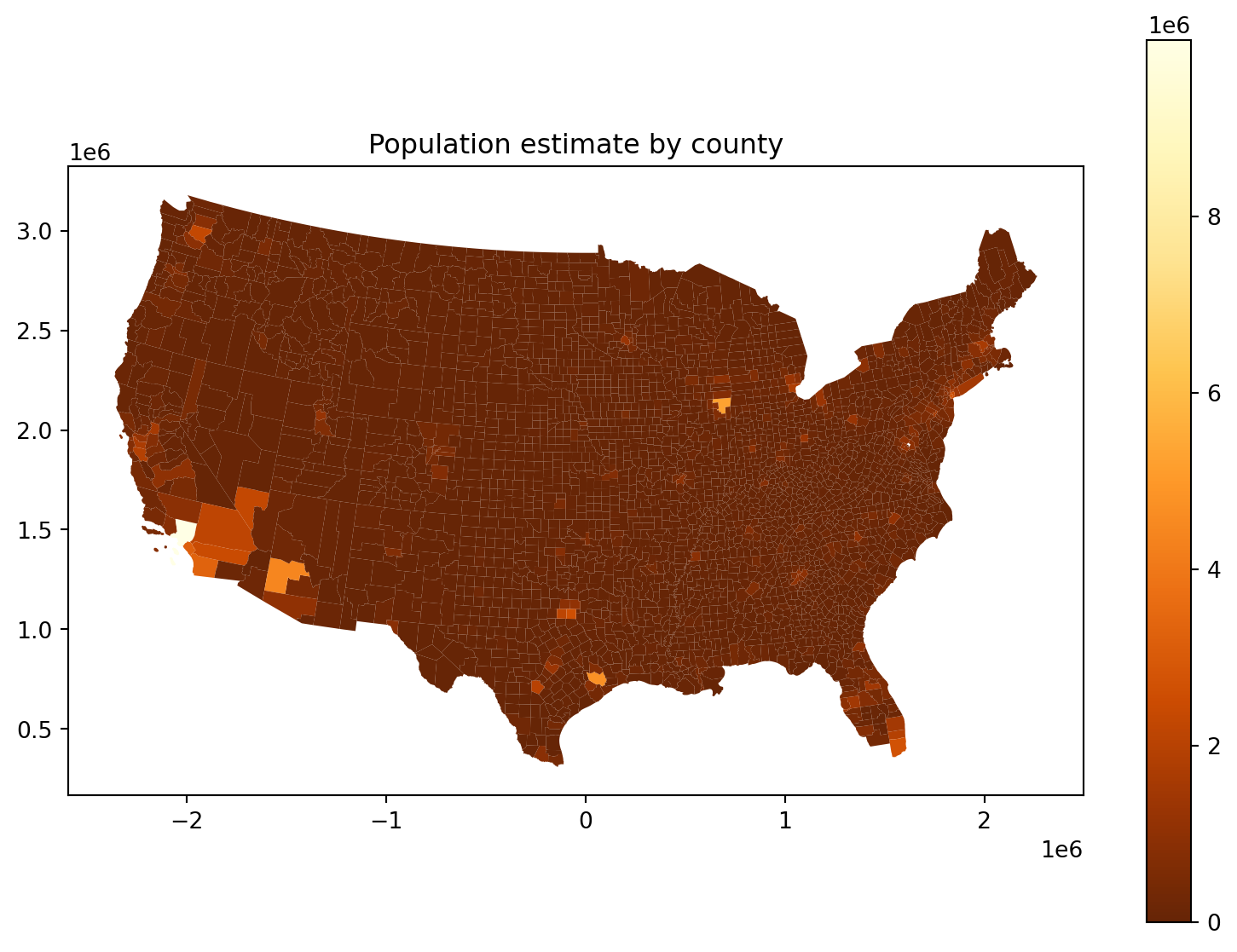
fig, ax = plt.subplots(1, 1, figsize=(10, 7))
ax.set_title("Population estimate by county")
cdf.plot(column='POPESTIMATE', legend=True, ax=ax, vmin=0, cmap='YlOrBr_r');

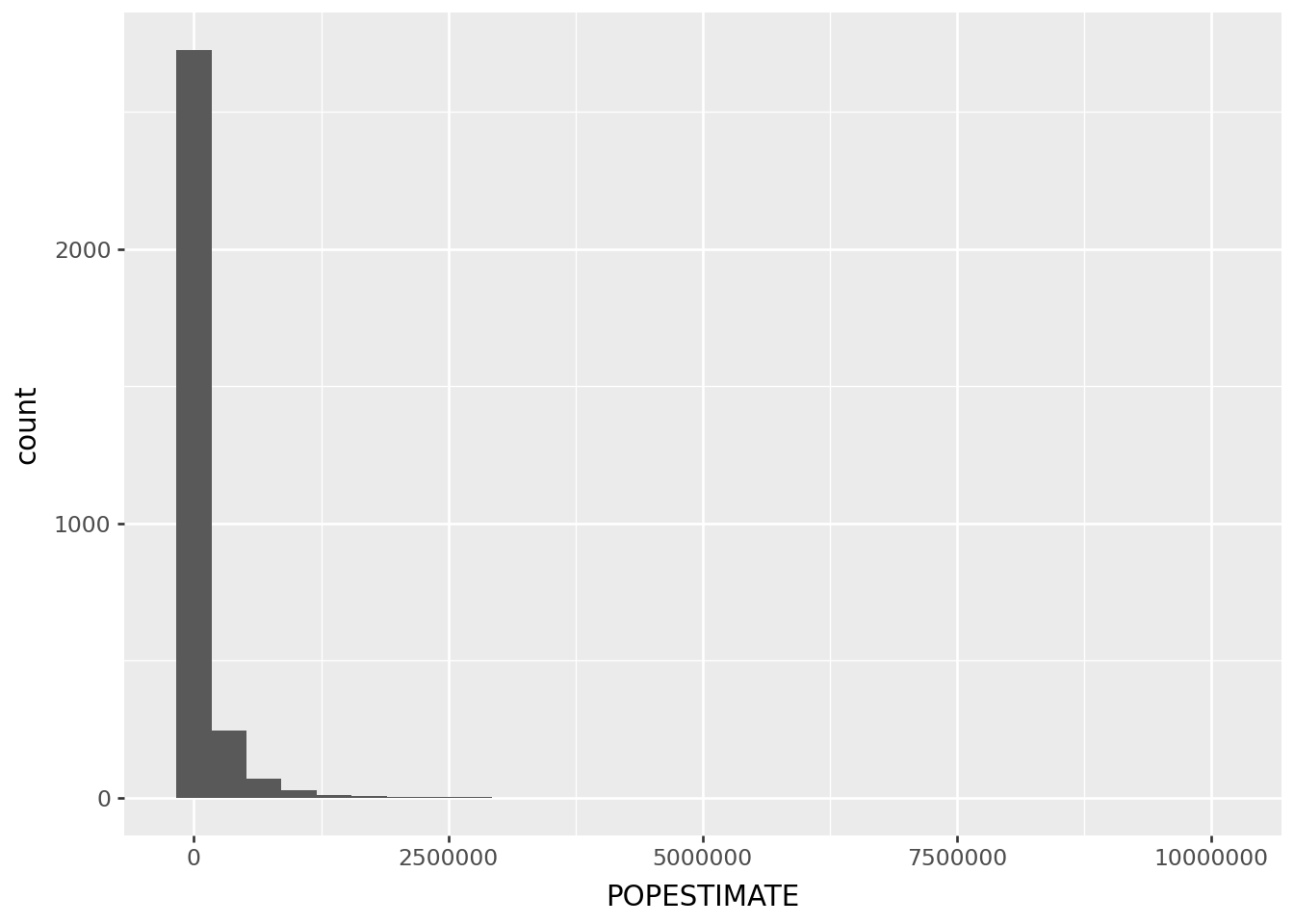
The problem:

p9.ggplot(cdf, p9.aes(x='POPESTIMATE')) + p9.geom_histogram(bins=30)
/home/peter/micromamba/envs/ds435/lib/python3.13/site-packages/plotnine/layer.py:293: PlotnineWarning: stat_bin : Removed 1 rows containing non-finite values.

Where do the people live, take 2:

Log scale:
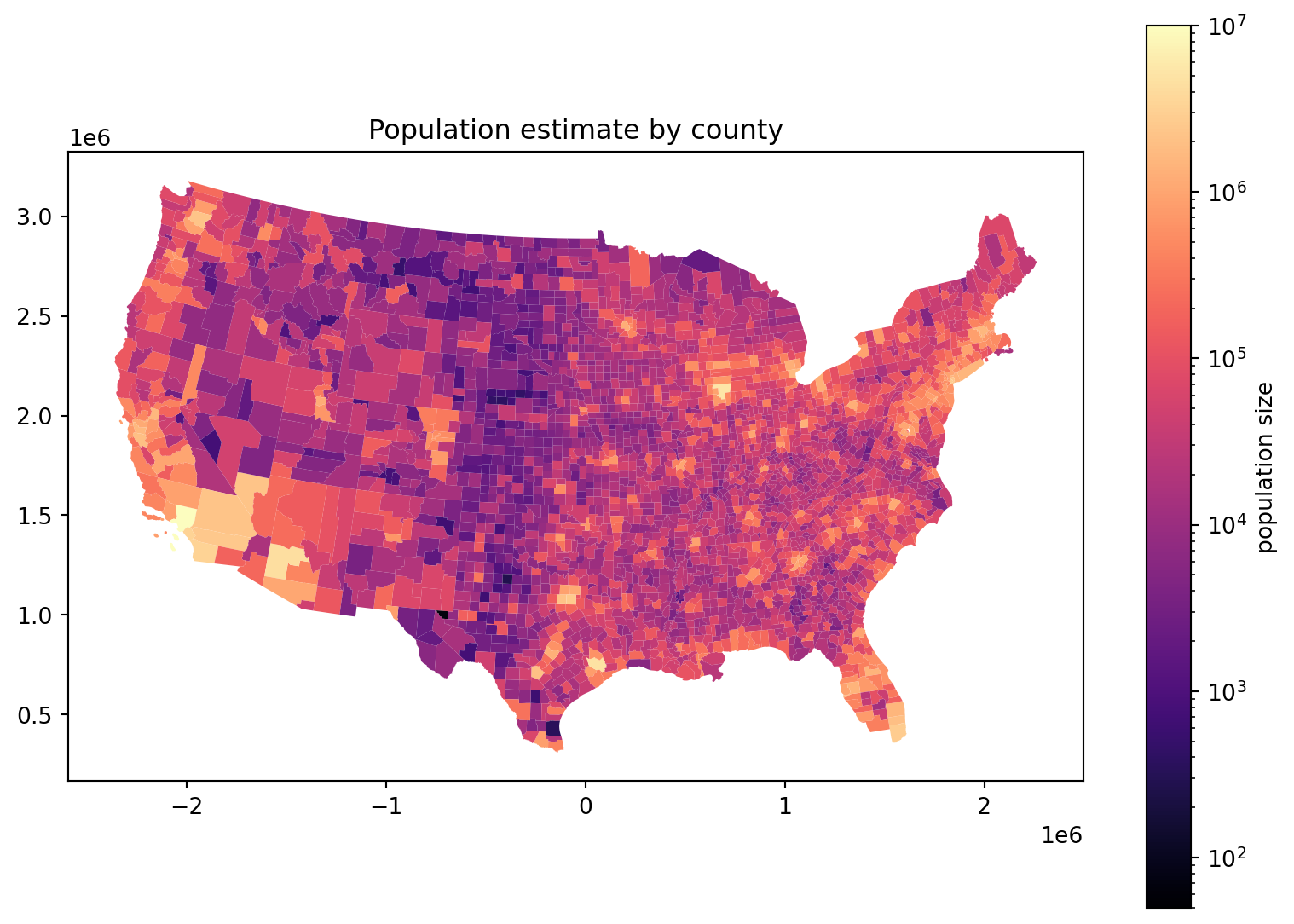
fig, ax = plt.subplots(1, 1, figsize=(10, 7))
ax.set_title("Population estimate by county")
cdf.plot(column='POPESTIMATE', legend=True, ax=ax, 
      norm=matplotlib.colors.LogNorm(vmin=50, vmax=1e7),
      cmap='magma',
      legend_kwds={'label': 'population size'},
);

Where are there more people?

An obvious confounding factor above was county size: can we compare San Bernardino County to NYC’s five boroughs (=counties)? Let’s compute density, in people/km\({}^3\). First: shapely gives area, but what units are we in? Ah, meters:

cdf.crs.axis_info
[Axis(name=Easting, abbrev=X, direction=east, unit_auth_code=EPSG, unit_code=9001, unit_name=metre),
 Axis(name=Northing, abbrev=Y, direction=north, unit_auth_code=EPSG, unit_code=9001, unit_name=metre)]

So, this is in units of m\({}^3\):

cdf['geometry'].area
0       1.488336e+09
1       7.425453e+08
2       6.045909e+09
3       2.192120e+09
4       1.491364e+09
            ...     
3103    1.116142e+09
3104    4.346691e+09
3105    1.921876e+09
3106    2.341881e+09
3107    1.326365e+09
Length: 3108, dtype: float64

Where do the people live, take 3:

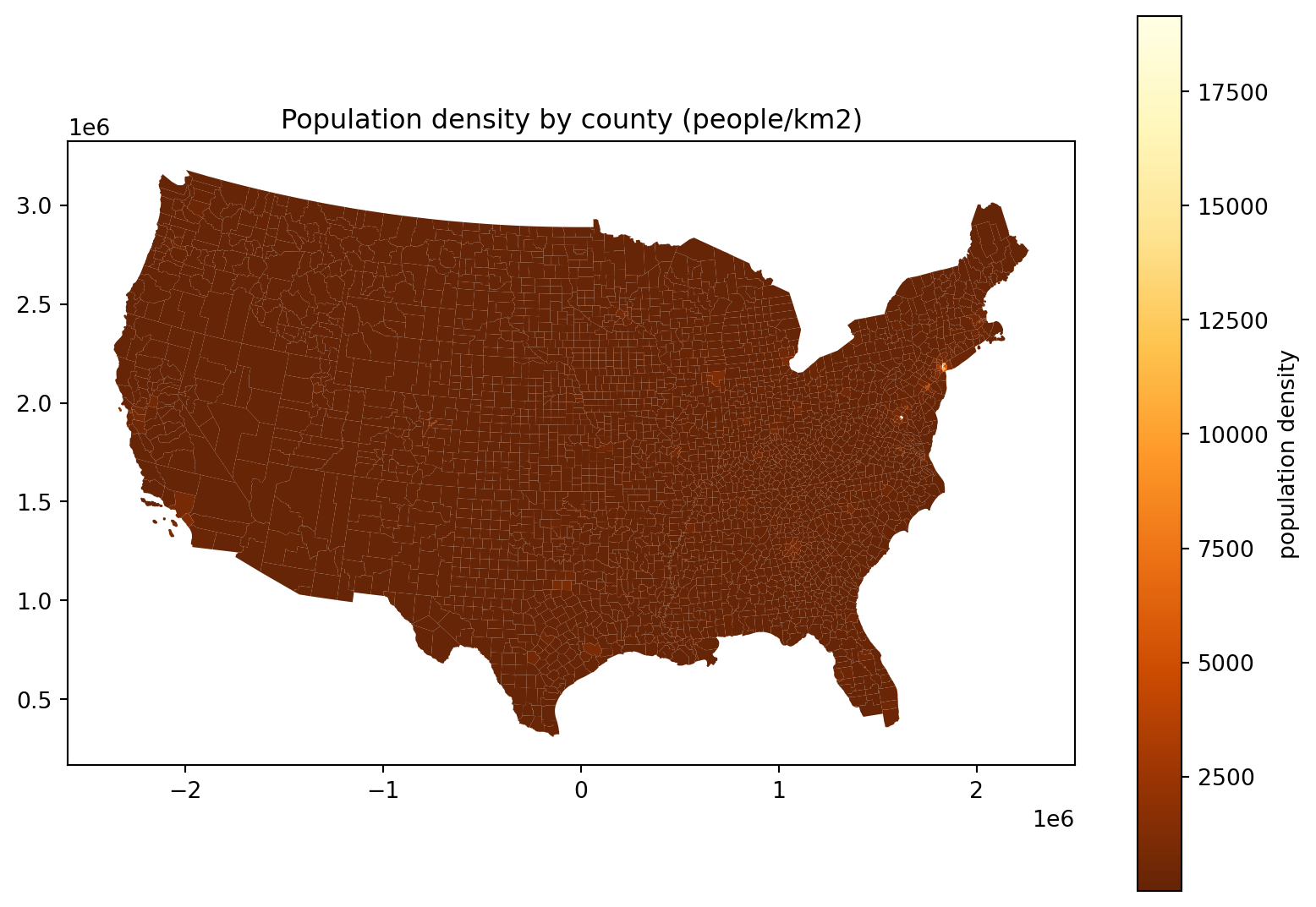
fig, ax = plt.subplots(1, 1, figsize=(10, 7))
ax.set_title("Population density by county (people/km2)")
(
    cdf
    .assign(density=lambda df: df['POPESTIMATE']*1e6/df['geometry'].area)
    .plot(column='density', legend=True, ax=ax, legend_kwds={'label': 'population density'}, cmap='YlOrBr_r')
);
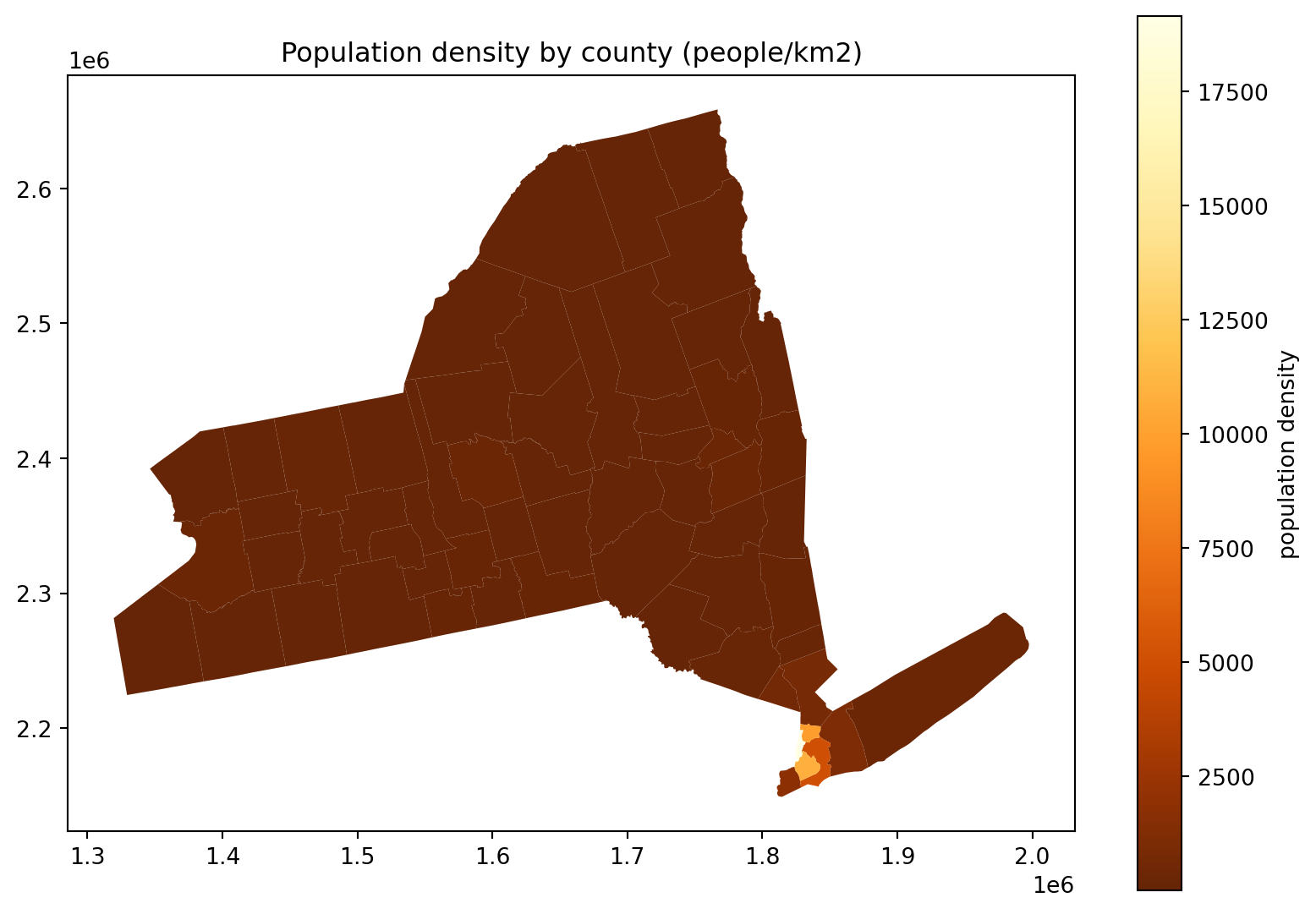
Hm, where’s all the people in this plot?

fig, ax = plt.subplots(1, 1, figsize=(10, 7))
ax.set_title("Population density by county (people/km2)")
(
    cdf
    .query("STNAME == 'New York'")
    .assign(density=lambda df: df['POPESTIMATE']*1e6/df['geometry'].area)
    .plot(column='density', legend=True, ax=ax, legend_kwds={'label': 'population density'}, cmap='YlOrBr_r')
);

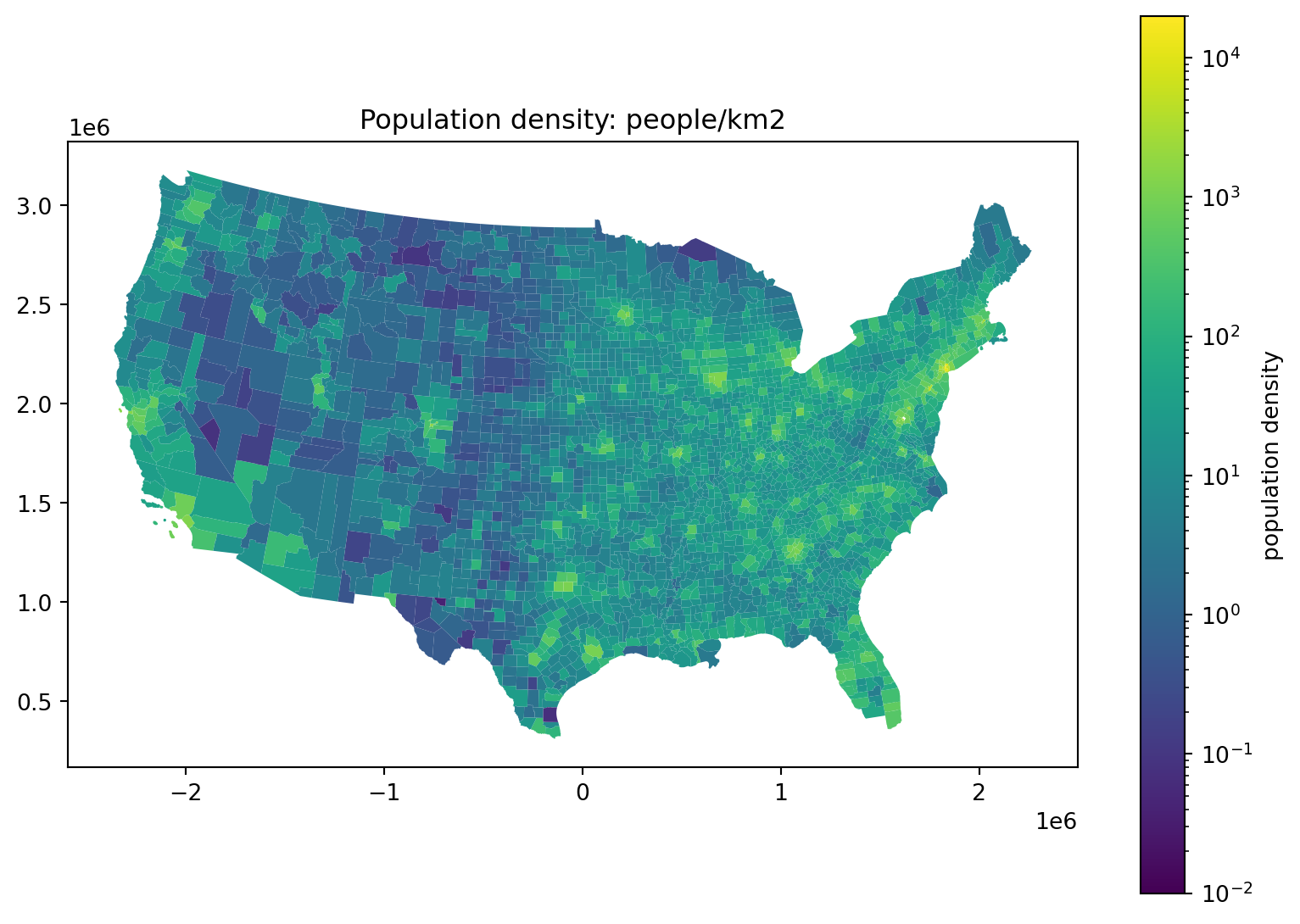
Where do the people live, take 4:

fig, ax = plt.subplots(1, 1, figsize=(10, 7))
ax.set_title("Population density: people/km2")
(
    cdf
        .assign(density=lambda df: df['POPESTIMATE']*1e6/df['geometry'].area)
        .plot(column='density', legend=True, ax=ax,
              norm=matplotlib.colors.LogNorm(vmin=0.01, vmax=2e4),
              legend_kwds={'label': 'population density'},
        )
);
Where do the people live, take 5:

Alternatively, we could truncate:
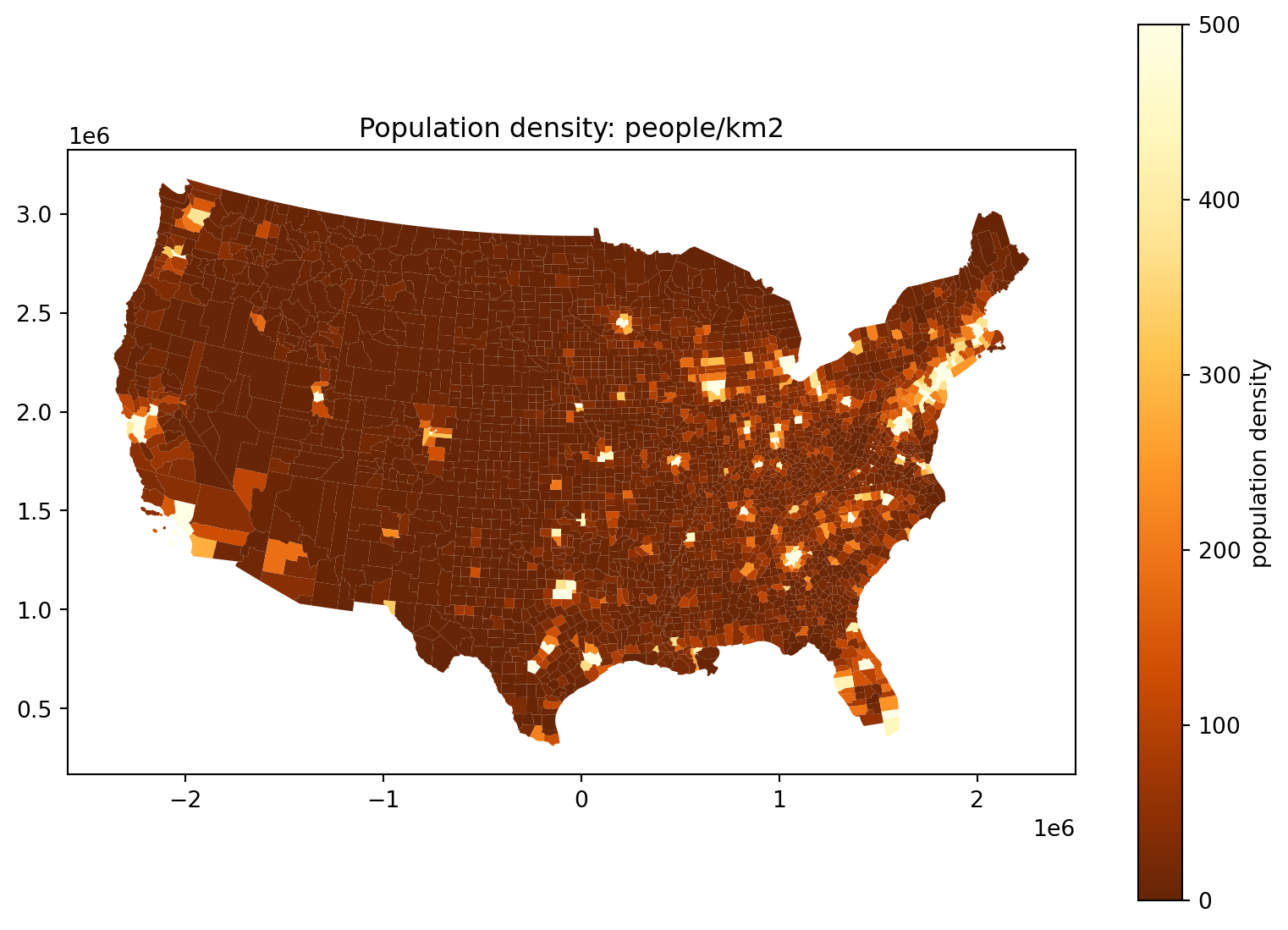
fig, ax = plt.subplots(1, 1, figsize=(10, 7))
ax.set_title("Population density: people/km2")
(
    cdf
        .assign(density=lambda df: df['POPESTIMATE']*1e6/df['geometry'].area)
        .plot(column='density', legend=True, ax=ax,
              vmin=0, vmax=500, cmap='YlOrBr_r',
              legend_kwds={'label': 'population density'},
        )
);

Sex ratios

It’s a curious demographic fact that the human sex ratio is slightly skewed towards males at birth, but more strongly towards females in old age. Does this vary with geography?

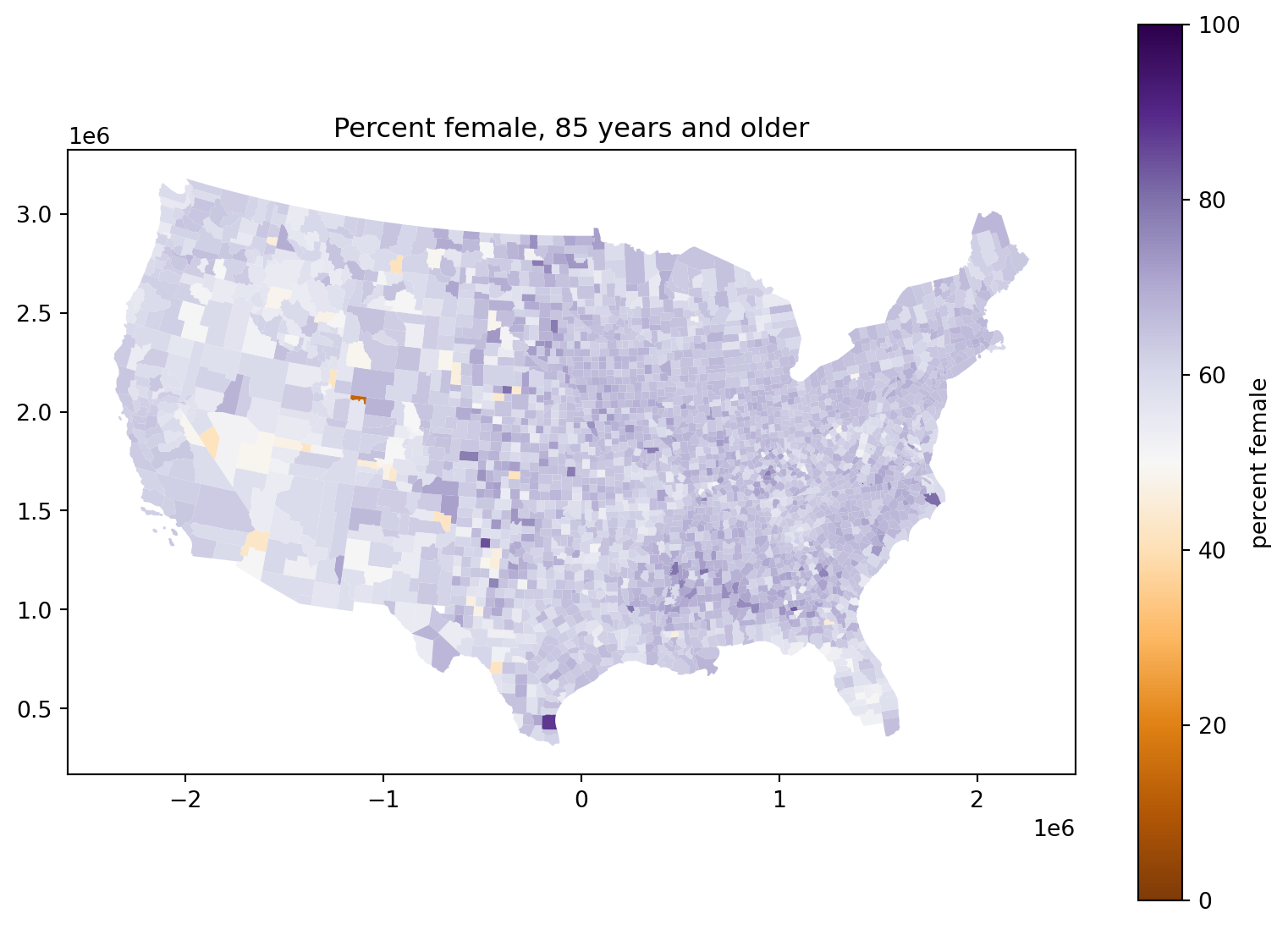
Percent female, 85 years and older:

fig, ax = plt.subplots(1, 1, figsize=(10, 7))
ax.set_title("Percent female, 85 years and older")
(
    cdf
        .assign(pfem=100*cdf['AGE85PLUS_FEM']/cdf['AGE85PLUS_TOT'])
        .plot(column='pfem', legend=True, ax=ax,
              legend_kwds={'label': 'percent female'},
              cmap='PuOr', vmin=0, vmax=100,
        )
);

Percent female, 4 years and younger:

What’s going on with those counties in the middle of the country?
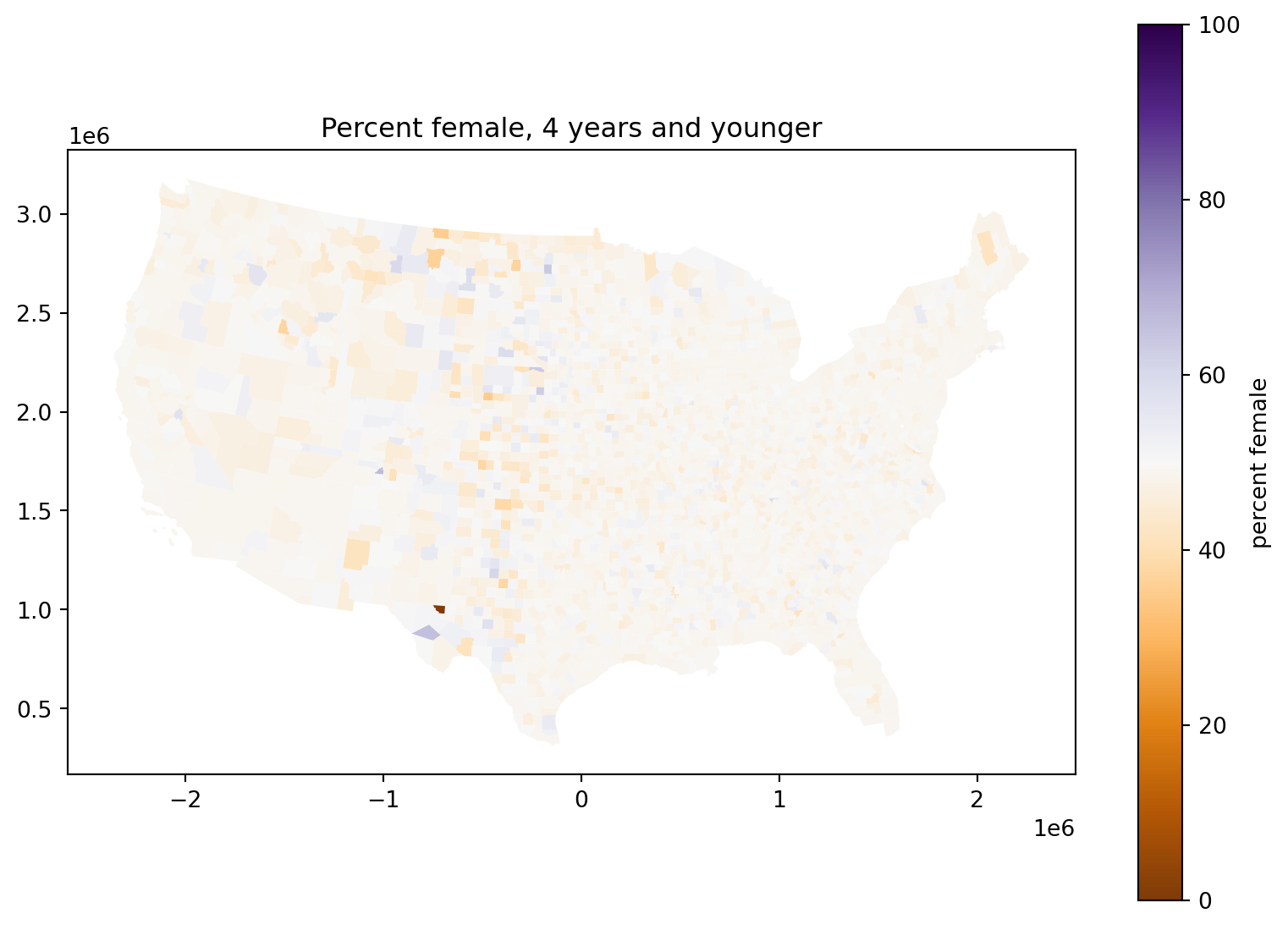
fig, ax = plt.subplots(1, 1, figsize=(10, 7))
ax.set_title("Percent female, 4 years and younger")
(
    cdf
        .assign(pfem=100*cdf['AGE04_FEM']/cdf['AGE04_TOT'])
        .plot(column='pfem', legend=True, ax=ax,
              legend_kwds={'label': 'percent female'},
              cmap='PuOr', vmin=0, vmax=100,
        )
);

Exercise: debunk yourself

  1. Come up with a wild explanation for why counties in the middle of the country tend to have a sex ratio at birth that is farther from 50%.

  2. Explain why it’s not supported by the data.
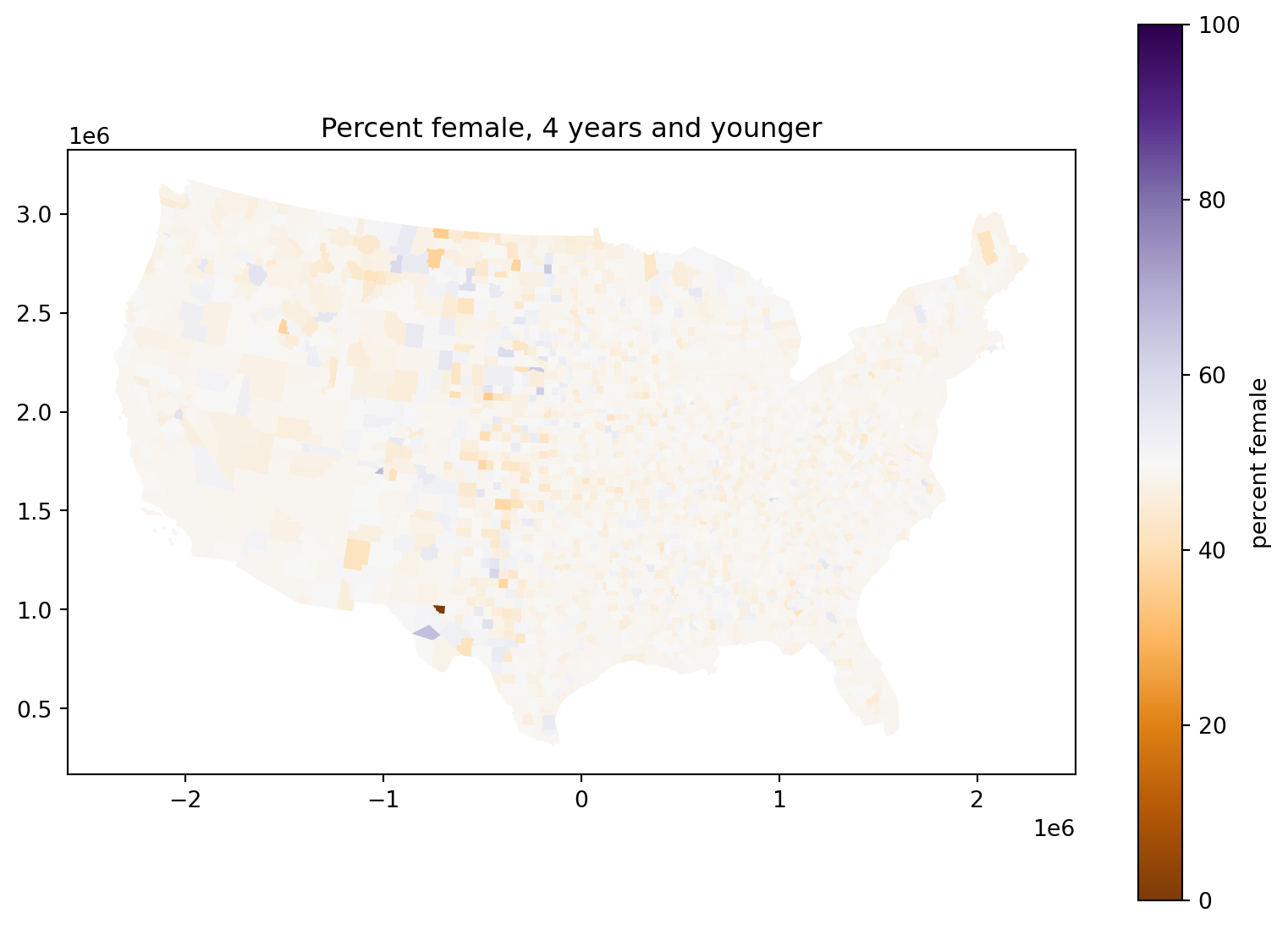
fig, ax = plt.subplots(1, 1, figsize=(10, 7))
ax.set_title("Percent female, 4 years and younger")
(
    cdf
        .assign(pfem=100*cdf['AGE04_FEM']/cdf['AGE04_TOT'])
        .plot(column='pfem', legend=True, ax=ax,
              legend_kwds={'label': 'percent female'},
              cmap='PuOr', vmin=0, vmax=100,
        )
);

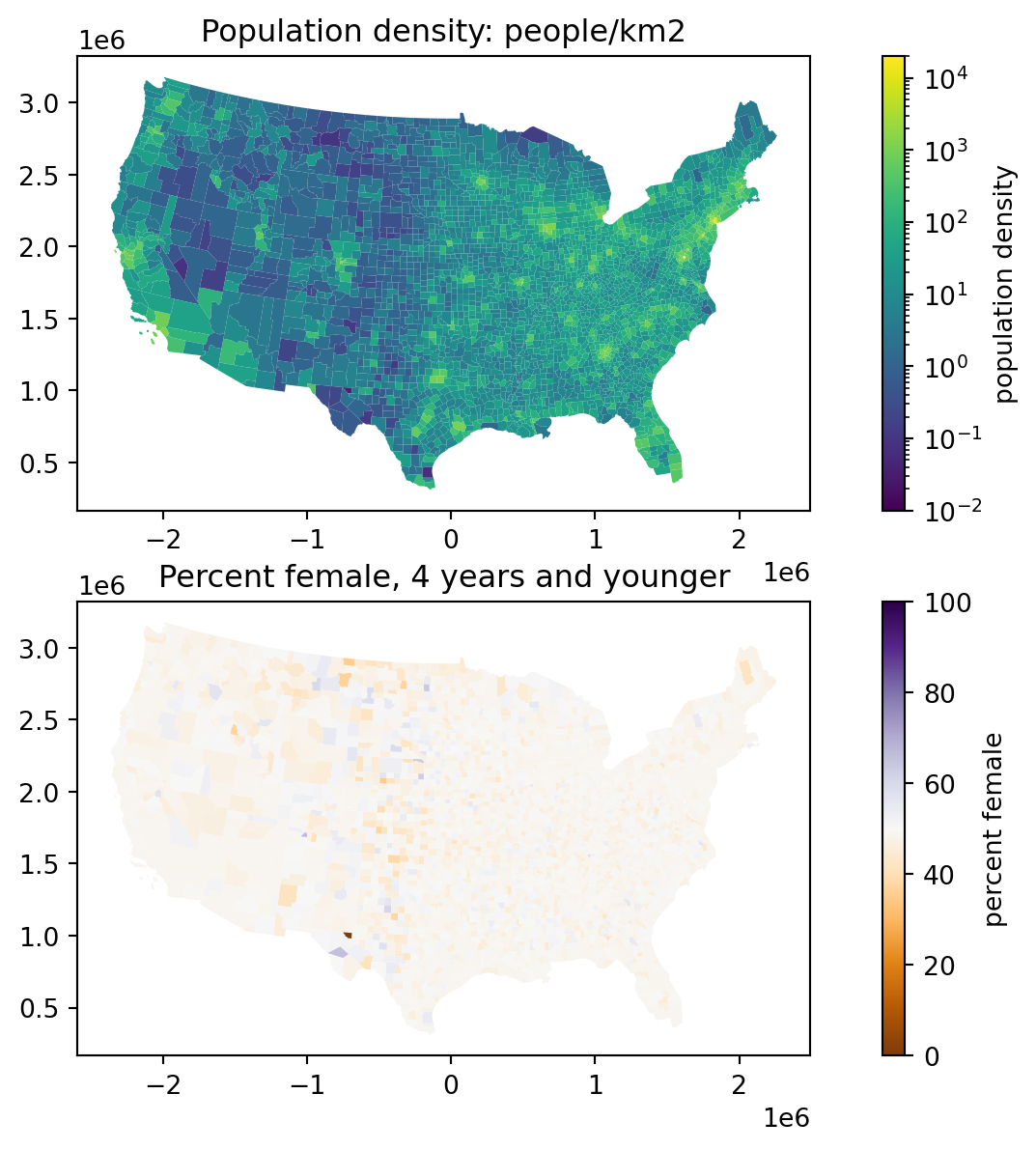
Okay but what is going on?

Consider:

fig, (ax1, ax2) = plt.subplots(2, 1, figsize=(10, 7))
ax1.set_title("Population density: people/km2")
(
    cdf .assign(density=lambda df: df['POPESTIMATE']*1e6/df['geometry'].area)
        .plot(column='density', legend=True, ax=ax1,
              norm=matplotlib.colors.LogNorm(vmin=0.01, vmax=2e4),
              legend_kwds={'label': 'population density'},)
);
ax2.set_title("Percent female, 4 years and younger")
(
    cdf .assign(pfem=100*cdf['AGE04_FEM']/cdf['AGE04_TOT'])
        .plot(column='pfem', legend=True, ax=ax2,
              legend_kwds={'label': 'percent female'},
              cmap='PuOr', vmin=0, vmax=100,)
);
Statistics

Recall that: if we’re estimating a proportion from \(n\) samples then the standard error is proportional to \(1/\sqrt{n}\).

More precisely: if \(X \sim \text{Binomial}(n, p)\), then \[ \text{sd}[X] = \sqrt{n p (1-p)} , \] and so with \(\hat{p} = \frac{X}{n}\), \[ \text{sd}(\hat{p}) = \sqrt{\frac{p(1-p)}{n}} . \]

Takeaway: less populous counties are noisier.

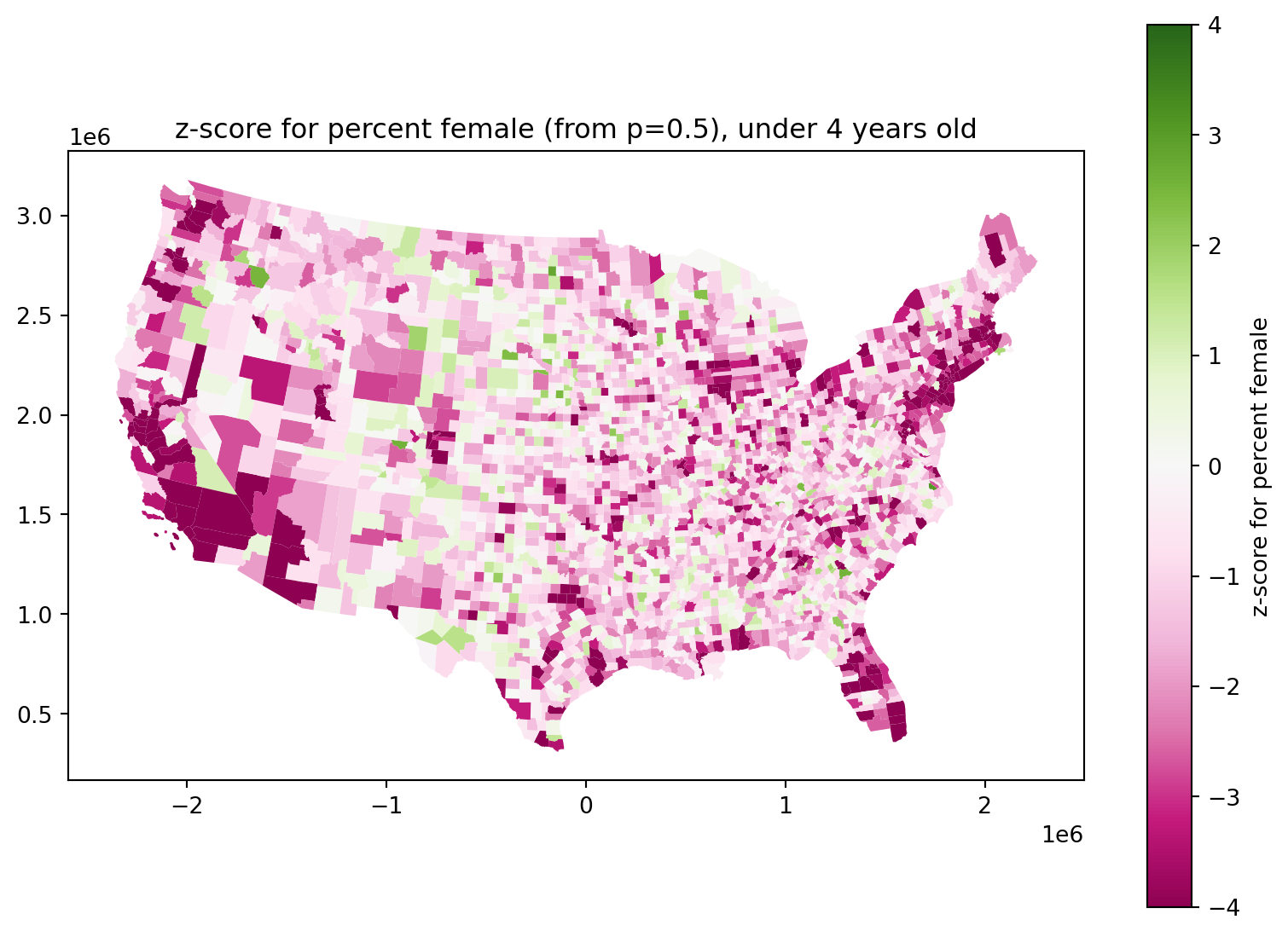
Let’s compute a \(z\)-score, and plot that.

Are newborn sex ratios even?

They look definitely skewed male:

fig, ax = plt.subplots(1, 1, figsize=(10, 7))
ax.set_title(f"z-score for percent female (from p=0.5), under 4 years old")
(
    cdf
        .assign(
            z = lambda df: (df['AGE04_FEM'] - 0.5 * df['AGE04_TOT']) / np.sqrt(0.5 * (1-0.5) * df['AGE04_TOT']),
        )
        .plot(column='z', legend=True, ax=ax,
              legend_kwds={'label': 'z-score for percent female'},
              cmap='PiYG', vmin=-4, vmax=4,
        )
);
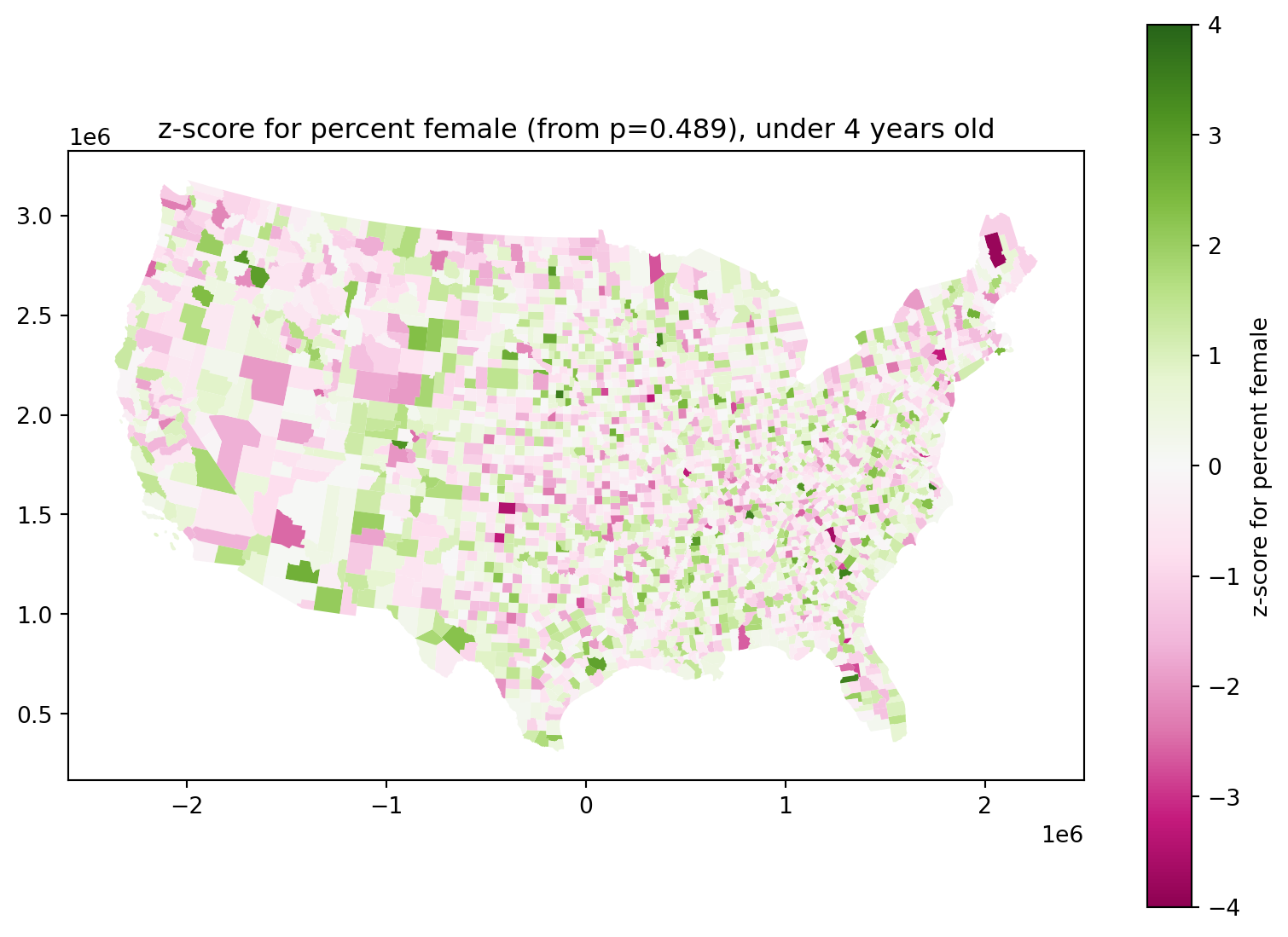
Do newborn sex ratios differ across the country?

They look definitely skewed male:

total_pfem = cdf['AGE04_FEM'].sum() / cdf['AGE04_TOT'].sum()

fig, ax = plt.subplots(1, 1, figsize=(10, 7))
ax.set_title(f"z-score for percent female (from p={total_pfem:.3}), under 4 years old")
(
    cdf
        .assign(
            z = lambda df: (df['AGE04_FEM'] - total_pfem * df['AGE04_TOT']) / np.sqrt(total_pfem * (1-total_pfem) * df['AGE04_TOT']),
        )
        .plot(column='z', legend=True, ax=ax,
              legend_kwds={'label': 'z-score for percent female'},
              cmap='PiYG', vmin=-4, vmax=4,
        )
);
Some of those \(z\)-scores are still pretty big:

z = (
    cdf.assign(
        z=lambda df: (df['AGE04_FEM'] - total_pfem * df['AGE04_TOT']) / np.sqrt(total_pfem * (1-total_pfem) * df['AGE04_TOT'])
    )
    .sort_values("z")
)[['NAME', 'STNAME', 'z', 'AGE04_FEM', 'AGE04_MALE', 'AGE04_TOT']]
z
NAME STNAME z AGE04_FEM AGE04_MALE AGE04_TOT
2112 Piscataquis Maine -3.824404 342.0 469.0 811.0
1352 Greenville South Carolina -3.655523 15367.0 16739.0 32106.0
2208 Beaver Oklahoma -3.497506 105.0 169.0 274.0
2195 Monroe Illinois -3.287300 899.0 1090.0 1989.0
2206 Iowa Iowa -3.265651 415.0 537.0 952.0
... ... ... ... ... ... ...
971 Pasco Florida 3.491971 14051.0 14094.0 28145.0
2303 Davidson Tennessee 3.508938 23586.0 23882.0 47468.0
1215 Madison Nebraska 3.549922 1326.0 1204.0 2530.0
1801 Perquimans North Carolina 3.633339 332.0 257.0 589.0
606 District of Columbia District Of Columbia NaN NaN NaN NaN

3108 rows × 6 columns

Are they bigger than we’d expect?

Here’s a low-tech QQ plot:

rng = np.random.default_rng(seed=123)

z = (
    cdf.assign(
        z=lambda df: (df['AGE04_FEM'] - total_pfem * df['AGE04_TOT']) / np.sqrt(total_pfem * (1-total_pfem) * df['AGE04_TOT'])
    )
    .sort_values("z")
)[['NAME', 'STNAME', 'z', 'AGE04_FEM', 'AGE04_MALE', 'AGE04_TOT']]

(
    z.assign(znorm = np.sort(rng.normal(size=len(z))))
    >>
    p9.ggplot(p9.aes(x='z', y='znorm'))
    + p9.geom_point()
    + p9.labs(x='empirical z values', y='Normal random draws')
    + p9.theme(aspect_ratio=1.0)
    + p9.geom_abline(slope=1, intercept=0)
)
/home/peter/micromamba/envs/ds435/lib/python3.13/site-packages/plotnine/layer.py:374: PlotnineWarning: geom_point : Removed 1 rows containing missing values.
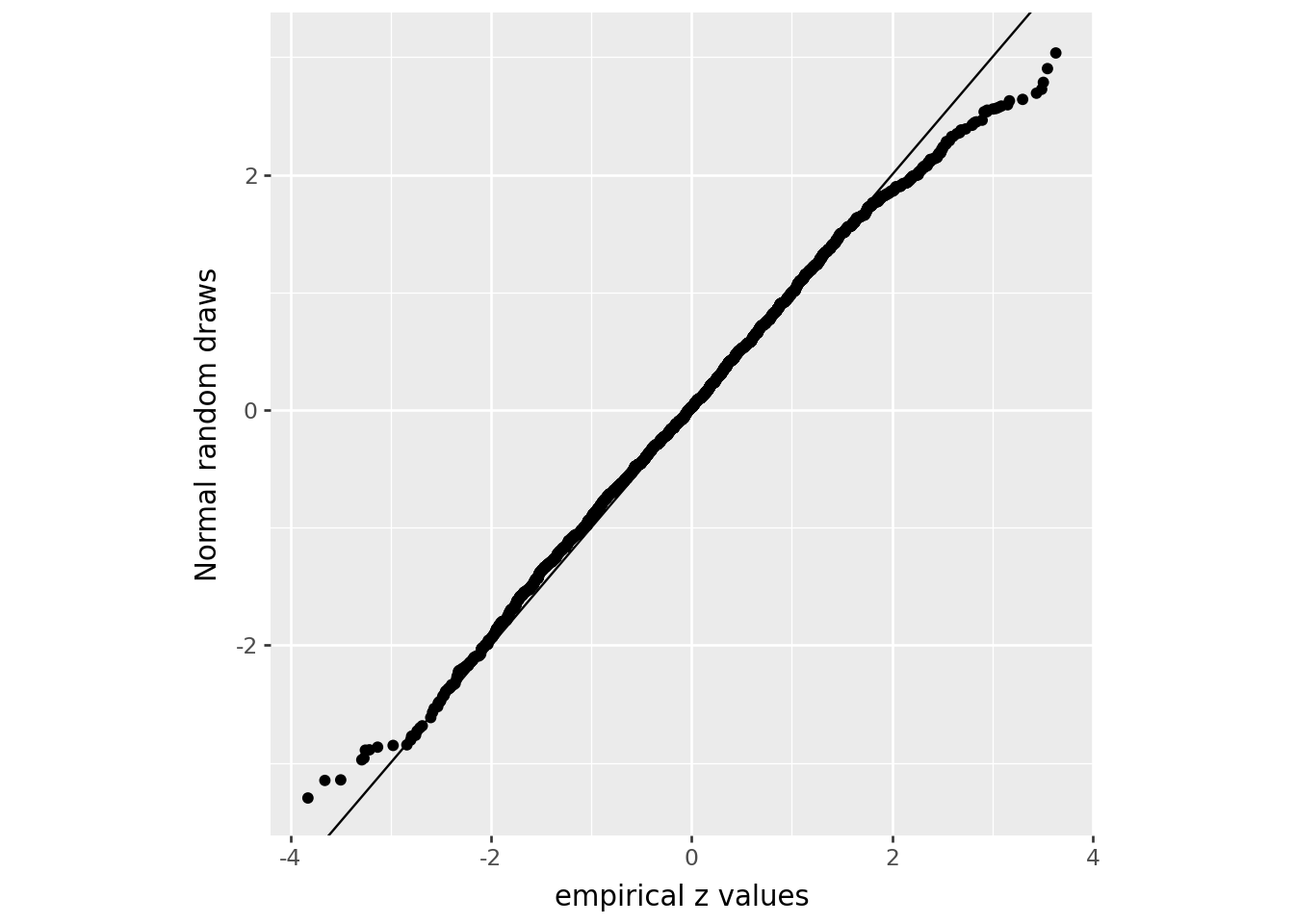
What’s going on here?

We’re comparing to a theoretical model that says “every person aged 0-4 in the data is either female, with probability 0.489, or male, independently of each other”.

  • There are more large (positive and negative) \(z\)-scores in the data than we’d expect.

  • In other words, the data are overdispersed relative to our model.

  • (Note: the \(z\)-scores do not tell us how much the counties differ from 48.9%.)

  • This is probably to be expected, for real data: literally any additional source of noise in these numbers could do this. Most likely options:

    • These numbers are estimates: they didn’t actually survey every person. Counties with lower sampling would have larger errors.
    • The Census has added noise to the data since 2020, for privacy reasons.